


Glucose Buddy Diabetes Tracker
2.05.66K Reviews
App Specs
- Version
- 5.36.9582
- Updated On
- License
- Free
- Downloads
- 500,000+
- Developer
- Azumio Inc.
- Categories
- Medical
- Platform
- Android
Screenshots
 Analysis by AppCompare
Choosing a diabetes tracker is less about finding the longest feature list and more about finding a routine you will actually keep up with. I would ask three questions before committing: Can I record the details I need without turning every meal into a chore? Will the information help me have a more useful conversation with my care team? And does the app fit the way I already manage medication, exercise, and glucose checks? Glucose Buddy Diabetes Tracker is aimed at people who want those everyday records collected in one place, rather than scattered across notes, a calendar, and memory.
Decide what you want the record to do
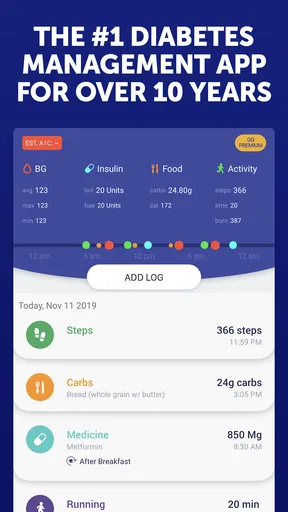
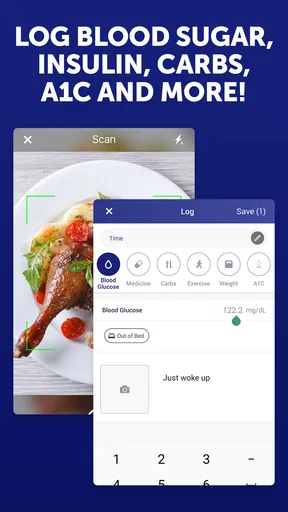
A log is most valuable when it answers a practical question. You might want to see whether a reading tends to differ on days when you exercise, remember when you took medication, or keep meal notes alongside glucose entries. Glucose Buddy brings blood glucose, A1C, carbohydrate intake, medication, and exercise tracking into a single health record. That makes it a sensible candidate if your main problem is keeping these details organized, not a lack of medical advice.
I would also be realistic about the effort involved. A tracker cannot create a complete picture if entries are skipped or logged inconsistently. Before filling in every available field, decide what you and your clinician actually want to review. A small, steady record of the information that matters to you can be more useful than an ambitious routine that becomes tedious after a few days.
Where a combined tracker earns its place
The practical advantage of bringing several kinds of entries together is context. A glucose reading on its own is just a number; a reading recorded near a meal, medication entry, or exercise note may be easier to discuss and interpret over time. I find that especially helpful for someone preparing for an appointment: instead of trying to reconstruct the previous weeks from memory, they can review a consistent log and make a short list of questions.
There is a useful trade-off here. Recording carbohydrates and activity can help you notice what was happening around a reading, but those entries are still notes, not proof that one event caused another. A chart can reveal a pattern worth asking about; it cannot determine a treatment change. I would use the app to support conversations with a qualified health professional, not to replace their guidance or make medication decisions on my own.
A realistic day with the app
Imagine checking your glucose as part of your usual routine, then recording the result while the number is still in front of you. Later, you add a meal or carbohydrate note and log a walk or another activity. If you take medication on a schedule, a reminder can help bring that task back to mind during a busy day. At the end of the week, you can look for entries that seem worth discussing rather than relying on a vague recollection of “good” or “bad” days.
One small habit can make this workflow more useful: add a brief note when something about the day seems relevant, instead of trying to write a full diary. For example, note an unusual meal or a change to your normal activity if that is information you want to bring up with your clinician. Keep the wording factual and simple. The aim is to preserve context, not to diagnose yourself from a few entries.
Worth Reading Before You Choose

EA SPORTS FC Mobile 26 Is a Bigger Football Game, but It Takes Time

Flipboard Shows What News Apps Must Do Beyond the Feed

Switching to Android Auto Means Rethinking Your Driving Routine

Google Calendar Makes a Crowded Week Easier to Manage

Ludo King Makes the Most of the Minutes Between Plans

Baby Panda World Brings Quick Play to Modern Phones, but Its Game Library Feels Busy
How it compares with other ways to track
Compared with a paper notebook, an app can make it easier to keep entries together and review trends visually. A notebook may still suit someone who prefers writing by hand, wants no screen involved in the routine, or finds phone entry distracting. Compared with a general health journal, Glucose Buddy has a more focused purpose: its tracking is organized around diabetes-related details rather than a broad record of sleep, mood, and unrelated habits.
Some people may prefer a tracker built around a particular glucose device or an all-purpose health platform they already use. Those options can be a better fit when the priority is keeping one existing digital routine or device workflow intact. I would compare the actual entry process before switching: how many steps it takes to record a reading, whether the fields match your care plan, and whether you can review the history in a way that makes sense to you. A broader feature set is not automatically a better fit if it makes routine logging harder.
If your needs are limited to occasional notes, a basic journal may be enough. If you need clinical interpretation, treatment recommendations, or a device-specific function, choose a tool and care plan designed for that purpose rather than assuming a general tracker provides it. The right alternative depends on the job you need done, not on which app sounds most comprehensive.
What to consider before switching
Changing trackers has a quiet cost: you may need to rebuild habits, decide which information to carry forward, and get comfortable with a different way of reviewing your history. Before making the move, consider what you already record and what you genuinely use. If your current method helps you remember medication and prepare for appointments, switching only makes sense if this app improves a real point of friction.
It is also worth checking the payment details before settling into a longer-term routine. The app is free to download, with in-app purchases priced from around fifteen to sixty dollars per item. I would explore the parts relevant to your routine and check what is included before paying. Glucose Buddy is from Azumio Inc.; it has an Everyone age rating, a 2.4 average from around fifteen thousand ratings, and more than five hundred thousand installs. Those figures do not tell me whether it will suit an individual, but they are a reason to try it with modest expectations and judge the current experience for yourself.
First Impressions and Setup
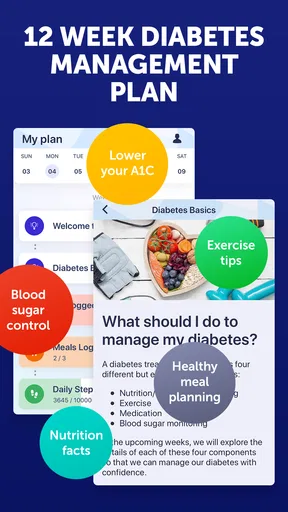
Getting started with Glucose Buddy Diabetes Tracker is as easy as pie (sugar-free, of course). The app welcomes you with a clean interface that’s both intuitive and user-friendly. You don’t have to be a tech whiz to navigate through the setup process. Just input your basic details like age, weight, and the type of diabetes you’re managing. It’s a breeze to set up, and it only takes a couple of minutes.
One thing I noticed right off the bat is the app's seamless integration with other health apps. If you’re using a fitness tracker or another health app, Glucose Buddy syncs effortlessly, pulling in all your data to give you a comprehensive view of your health. That’s a big win for those of us who like to keep all our health info in one place.
Features Galore
Now, let’s talk features. This app is packed with tools that make managing diabetes less of a headache. You can log your blood sugar levels, medications, meals, and even physical activities. It’s like having a diary that not only organizes your day but also helps you spot trends and patterns in your health data.
One feature I found particularly useful is the medication reminder. How many times have you been caught up in the hustle and bustle of the day and forgot to take your meds? With Glucose Buddy, those days are behind you. The app sends you gentle nudges to take your medication, ensuring you stay on top of your regimen.
Tracking and Insights
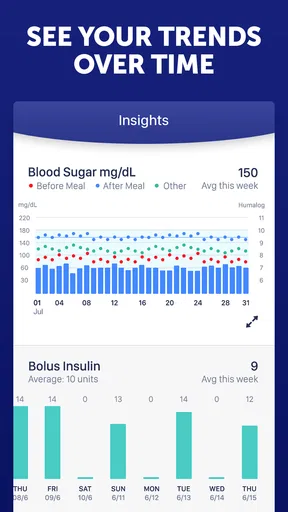
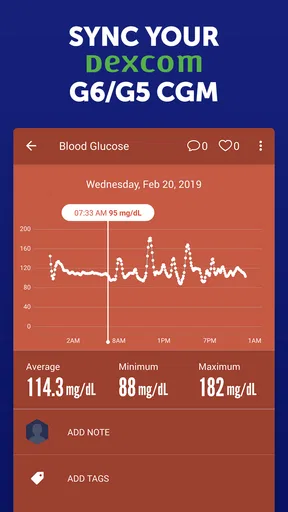
Tracking your data is one thing, but understanding it is another. That’s where Glucose Buddy really shines. The app provides insightful charts and graphs that make it easy to see how your blood sugar levels fluctuate over time. You can easily identify patterns and make informed decisions about your diet and lifestyle.
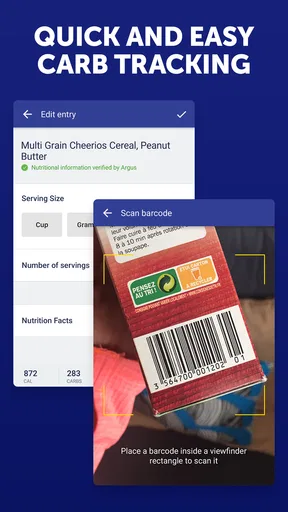
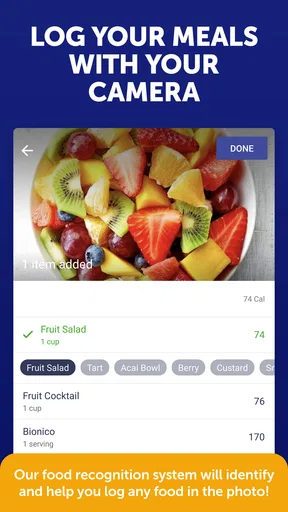
Moreover, the app offers a comprehensive food database, which is a lifesaver when you’re planning meals. You can log your meals with just a few taps, and the app helps you understand the nutritional impact of your food choices. It’s like having a nutritionist in your pocket.
Community and Support
Dealing with diabetes can sometimes feel isolating, but Glucose Buddy has a social feature that connects you with others. You can join forums and discussions, share your experiences, and learn from others who are on the same journey. It’s a supportive community that offers encouragement and tips for better management of your condition.
Plus, if you have any questions or run into issues, the app’s support team is just a message away. They’re responsive and genuinely helpful, which is reassuring when you’re relying on an app for health management.
Final Thoughts
All in all, Glucose Buddy Diabetes Tracker is a fantastic tool for anyone looking to take control of their diabetes management. It’s comprehensive, easy to use, and packed with features that make life a little easier. Whether you’re newly diagnosed or a seasoned pro at managing your condition, this app has something to offer.
If you’re ready to simplify your diabetes management, give Glucose Buddy Diabetes Tracker a try. It’s like having a supportive friend who’s always got your back, reminding you to take care of yourself. And honestly, who couldn’t use a buddy like that?
My recommendation
I would consider this a good fit if you want a diabetes-focused place to build a day-to-day record and are willing to enter information regularly. It is especially appealing if you are trying to connect readings with meals, activity, and medication notes, or if appointment preparation currently means searching through several places. The app has been available since June 2012, and version 5.36.9582 requires Android 6.0 or later, useful details to check before installing on an older device.
I would be more cautious if you expect the app to make clinical decisions, automatically handle every part of your monitoring, or replace a glucose meter, clinician, or treatment plan. A tracker is only as helpful as the records you keep and the way you use them. If manual logging feels like one more burden, a simpler method or a tool that fits your existing device routine may be a better choice.
My practical advice is to start with the entries you already know you need, then see whether the charts and reminders genuinely make your routine easier. Keep your care team’s instructions as the authority, and bring questions about patterns or medication to them rather than reacting to an isolated chart. For someone who wants an organized diabetes log and a gentle nudge toward consistency, I think this app is worth trying; for someone seeking medical guidance or a frictionless automatic record, I would look elsewhere.
Pros
- User-friendly interface for easy navigation.
- Comprehensive tracking of glucose levels.
- Customizable reminders for medication.
- Integration with fitness apps for holistic health view.
- Detailed reports to share with healthcare providers.
Cons
- Premium features require a subscription.
- Ads can be intrusive in the free version.
- Limited food database for tracking meals.
- Occasional syncing issues with devices.
- No offline mode for data entry.
FAQs for Glucose Buddy Diabetes Tracker
What features does Glucose Buddy Diabetes Tracker offer?
Glucose Buddy Diabetes Tracker provides a comprehensive suite of features to help manage diabetes. Users can log blood glucose levels, track medication and insulin, monitor carbohydrate intake, and view detailed reports. The app also offers reminders for medication and meal times, as well as integration with other health apps for a holistic view of health data.
Is Glucose Buddy suitable for all types of diabetes?
Yes, Glucose Buddy is designed to support individuals with Type 1, Type 2, and gestational diabetes. It provides customizable features that cater to different management needs, allowing users to track various metrics specific to their type of diabetes. However, it's always recommended to consult with a healthcare provider for personalized advice.
Does Glucose Buddy offer any premium features?
Glucose Buddy offers a premium subscription that unlocks additional features such as advanced analytics, personalized insights, and ad-free usage. The premium version also includes extended data reports and the ability to export data for sharing with healthcare providers. This can be particularly beneficial for users looking for deeper insights into their health.
How user-friendly is Glucose Buddy for beginners?
Glucose Buddy is designed with user-friendliness in mind, making it accessible for beginners. The interface is intuitive, with easy-to-follow instructions for logging and tracking data. The app also offers helpful tutorials and guides to assist new users in navigating its features, ensuring a smooth experience even for those new to diabetes management apps.
Can Glucose Buddy sync with other health apps or devices?
Yes, Glucose Buddy can sync with various health apps and devices, including fitness trackers and other health monitoring tools. This integration allows users to consolidate their health data in one place, providing a comprehensive view of their overall health. It's a feature that enhances the app's utility, especially for users who rely on multiple tools for health tracking.


